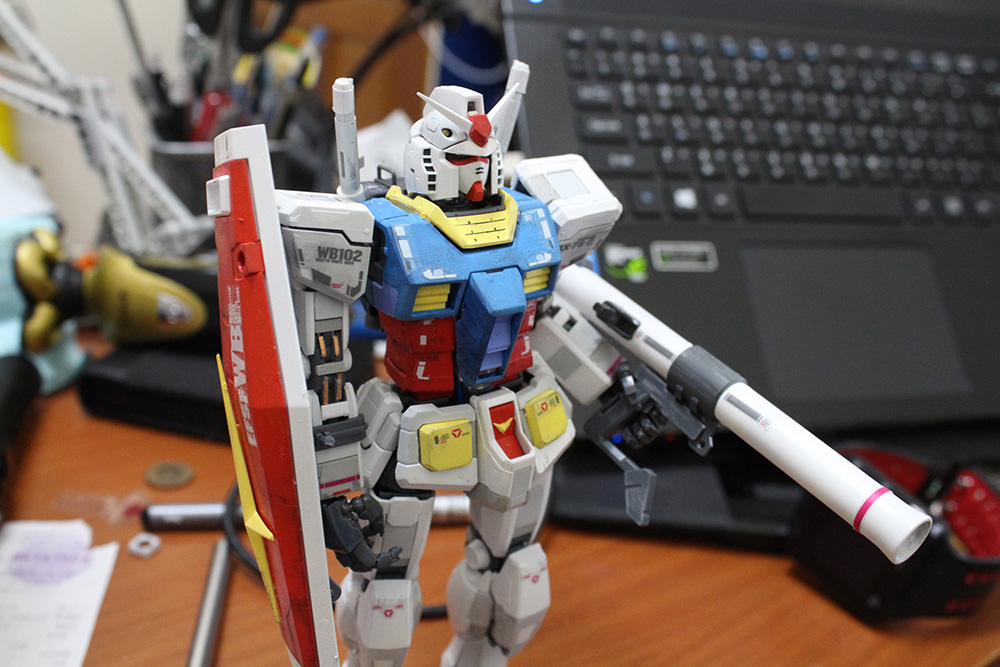
不專業的 第2次認真做模型 - Zeta


有別於上一篇模型使用筆塗,終於要來試試噴槍噴出來的效果
加上現在空壓機也超便宜,體積也蠻小的,很適合初學者一般小玩家使用


底下這張就是我第一個噴槍


買的顏料(這次要做的是Zeta,搭配Zeta顏色買了幾瓶


噴槍接好空壓機後的樣子


第一次使用噴槍,顏料跟溶劑比例一定要先試過,
而且建議去買滴管(10元商店),先滴到一個空瓶調過顏色後再倒進噴灌裡
如果沒用完至少明天還可以噴,大致上一個部位(用大約3滴-7滴就足以噴滿了)
沒噴滿或噴不均勻等待乾了之後,再噴一次,讓色澤跟厚度上去

噴槍裝噴漆千萬不要裝滿,真正要噴的其實只有幾公克顏料量
不然很容易塞住

塞住記得趕緊用溶劑徹底的清潔噴槍 , 不然下次用就掛了

每一次噴完收工,也要用溶劑徹底洗清,倒一點溶劑進噴槍,待一小小段時間後
用噴槍把溶劑噴出,直到噴出沒有任何顏色


白色是很好附著,不過也學到教訓,白色基本上直接去外面買白色噴漆就好了


黃色基本上也是(去外面買)只是黃色用到的地方很少,也不好附著
也是等乾了之後,多噴幾次


使用噴槍,我是建議買個槍架,有時候噴一噴要放,平放的話顏料會漏出來,
基本上還是保持垂直放,建議在室外噴,帶上口罩


噴槍噴出來的質感就是不一樣


這些零件建議剪下前先用標籤做編號,同色會一起先噴,到後面零件混稿混


最後就是完成品!!


再上個墨線,用粉灰色(有點像上妝在用的)替鋼彈製造一些陰影

第1次認真做模型 - RX78


這是一個做模型的備忘錄
既高中亂做模型以來,大概有10之久
一直到工作後終於有一個閒暇時間,可以好好買一隻模型來處理
這裡的"好好的"當然比不上專業製作模型的玩家,
是以一個忙碌的情況下,空出多餘的假日來製作

底下是一個RX78用筆塗的情況

筆塗必須上很多次,等乾了之後再上一次,黃色比較好上色一些


藍色部份位基本上要上非常多次,用筆塗的情況先橫的塗完,再直的塗,讓線條塗料平整的上去
反覆的這樣子,乾了再塗一次直到色澤均勻


反覆上色之後


終於許多次反覆上色之後,其實也有不錯的表現


白色部位用筆塗也是很難上的,基本上我還是建議用噴的(苦笑


完成後,筆塗有別於噴漆不同類型的感覺,同事看了其實反而還蠻喜歡筆塗的效果

用 3M 雙面膠 接回Z鋼彈右臂


很不幸的,放在公司的Z鋼彈某天突然右臂連接的地方突然斷了
基本上使用過各種膠,都無法完全癒合

最後看到網友有推薦只種方式,
1.打樁(可是這用在我的情況可能太容易失敗,因為區域太小
鑽下去可能會直接裂開 ,但也有可能是我沒有專業的鑿的工具)
2.重新造一個(用水晶土複製一個)
3.3M膠(可能對我來說是最簡便的 , 請看以下)
4.某模型店推薦用快乾粘,實際使用後只能撐不到幾分鐘又掛點


粘了之後 留下許多殘膠先清理乾淨


剪下一小塊 3M雙面膠粘貼 ( 跟3M使用方法一樣 靜置24小時,用力按壓30秒)


Z鋼彈又復活了!

在 FMS 寫 CODE


此篇為備忘錄

拿 Flash Media Server 來做視頻串流 不外乎就可以做
錄影,與額外的規範

可使用的內建方法可參考官方
https://helpx.adobe.com/adobe-media-server/ssaslr/application-class.html

實際存放CODE的位置在

C:\Program Files (x86)\Adobe\Flash Media Server 4.5\applications\live

範例 CODE 如下
底下實作一個,當呼叫 rtmp URL後 做出相對應輸入參數的判斷邏輯
 // mark - add application.doCheckClient = function() { var count = application.clients.length ; for(i = 0 ; i < count ; i++) { var target = application.clients[i] ; var server_id = target.server_id ; var no_run = target.no_run ; var no_active = target.no_active ; var game_status = target.game_status ; var check_value = no_run + "," + no_active + "," + game_status ; if(check_value != application.src_list[server_id]) { trace("loop-stop-it") ; application.disconnect(application.clients[i]) ; } else { trace("loop-it") ; } } } /* * application.onAppStart: * is called when application load. It contains Live (out of the box) * application specific initializations. */ application.onAppStart = function() { // Logging trace("Starting Live Service..."); // Turning on the Authentication by default this.HTMLDomainsAuth = true; this.SWFDomainsAuth = true; // Populating the list of domains which are allowed to host HTML file // which in turn may embed a SWF that connects to this application this.allowedHTMLDomains = this.readValidDomains("allowedHTMLdomains.txt","HTMLDomains"); // Populating the list of domains which are allowed to host a SWF file // which may connect to this application this.allowedSWFDomains = this.readValidDomains("allowedSWFdomains.txt","SWFDomains"); // Logging if(this.HTMLDomainsAuth){ trace("Authentication of HTML page URL domains is enabled"); } if(this.SWFDomainsAuth){ trace("Authentication of SWF URL domains is enabled"); } trace("...loading completed."); // mark - add - start application.src_list = Array() ; setInterval(this.doCheckClient , 2000) ; // mark - add - end } /* * application.validate: * function to validate a given URL by matching through a list of * allowed patterns. * * Parameters: * url: contains the input url string. * patterns: Array; an array of permmited url patterns. * * return value: * true; when 'url domain" contains a listed domains as a suffix. * false; otherwise. */ application.validate = function( url, patterns ) { // Convert to lower case url = url.toLowerCase(); var domainStartPos = 0; // domain start position in the URL var domainEndPos = 0; // domain end position in the URL switch (url.indexOf( "://" )) { case 4: if(url.indexOf( "http://" ) ==0) domainStartPos = 7; break; case 5: if(url.indexOf( "https://" ) ==0) domainStartPos = 8; break; } if(domainStartPos == 0) { // URL must be HTTP or HTTPS protocol based return false; } domainEndPos = url.indexOf("/", domainStartPos); if(domainEndPos>0) { colonPos = url.indexOf(":", domainStartPos); if( (colonPos>0) && (domainEndPos > colonPos)) { // probably URL contains a port number domainEndPos = colonPos; // truncate the port number in the URL } } for ( var i = 0; i < patterns.length; i++ ) { var pos = url.lastIndexOf( patterns[i]); if ( (pos > 0) && (pos < domainEndPos) && (domainEndPos == (pos + patterns[i].length)) ) return true; } return false; } /* * application.onConnect: * Implementation of the onConnect interface function (optional). * it is invoked whenever a client connection request connection. Live app uses this * function to authenticate the domain of connection and authorizes only * for a subscriber request. */ // 用戶端連線 // 取得GET參數 // (1)轉換成serverid,norun,noactive,gamestatus [或其他] // (2)呼叫取得gs狀態api [或其他] // 比對(1)和(2)的結果字串:不一致則斷線 // [todo?] 每N分鐘重新檢查 application.onConnect = function( p_client, p_autoSenseBW ) { // mark - add - start trace("client-uri=" + p_client.uri) ; var uri = p_client.uri ; var start_index = uri.indexOf("?") + 1 ; var info = "" ; if(start_index != 0) { info = uri.slice(start_index) ; info = info.split("=")[1] ; sub_info = info.split(",") ; p_client.server_id = sub_info[0] ; p_client.no_run = sub_info[1] ; p_client.no_active = sub_info[2] ; p_client.game_status = sub_info[3] ; } else { p_client.server_id = "" ; p_client.no_run = "" ; p_client.no_active = "" ; p_client.game_status = "" ; } trace("info = " + info) ; trace("server_id = " + p_client.server_id) ; trace("no_run = " + p_client.no_run) ; trace("no_active = " + p_client.no_active) ; trace("game_status = " + p_client.game_status) ; var api_loader = new LoadVars(); api_loader.onData = function(src) { trace("api_loader.onData-start") ; if (src == undefined) { trace("Error loading content.") ; return false ; } // 0604250002,011118022,1182,4 var check_value = p_client.no_run + "," + p_client.no_active + "," + p_client.game_status ; trace("check_value = " + check_value) ; trace("src = " + src) ; application.src_list[p_client.server_id] = src ; // trace("show====" + application.src_list[p_client.server_id]) ; if(src == check_value) { trace("client pass") ; } else { trace("client cant pass") ; application.disconnect(p_client) ; return false ; } } ; api_loader.decode("serverid="+p_client.server_id) ; // http://ddd.bacc1688.com:8933/GetServerInfo.aspx?serverid=0604250002 var url = "http://ddd.bacc1688.com:8933/GetServerInfo.aspx" ; trace("api url = " + url) ; api_loader.load(url) ; // mark - add - end // Check if pageUrl is from a domain we know. // Check pageurl // A request from Flash Media Encoder is not checked for authentication if( (p_client.agent.indexOf("FME")==-1) && (p_client.agent.indexOf("FMLE")==-1)) { // Authenticating HTML file's domain for the request : // Don't call validate() when the request is from localhost // or HTML Domains Authentication is off. if ((p_client.ip != "127.0.0.1") && application.HTMLDomainsAuth && !this.validate( p_client.pageUrl, this.allowedHTMLDomains ) ) { trace("Authentication failed for pageurl: " + p_client.pageUrl + ", rejecting connection from "+p_client.ip); return false; } // Authenticating the SWF file's domain for the request : // Don't call validate() when the request is from localhost // or SWF Domains Authentication is off. if ((p_client.ip != "127.0.0.1") && application.SWFDomainsAuth && !this.validate( p_client.referrer, this.allowedSWFDomains ) ) { trace("Authentication failed for referrer: " + p_client.referrer + ", rejecting connection from "+p_client.ip); return false; } // Logging trace("Accepted a connection from IP:"+ p_client.ip + ", referrer: "+ p_client.referrer + ", pageurl: "+ p_client.pageUrl); }else{ // Logging trace("Adobe Flash Media Encoder connected from "+p_client.ip); this.acceptConnection(p_client); } // As default, all clients are disabled to access raw audio and video and data bytes in a stream // through the use of BitmapData.draw() and SoundMixer.computeSpectrum()., Please refer // Stream Data Access doccumentations to know flash player version requirement to support this restriction // Access permissions can be allowed for all by uncommenting the following statements //p_client.audioSampleAccess = "/"; //p_client.videoSampleAccess = "/"; this.acceptConnection(p_client); // A connection from Flash 8 & 9 FLV Playback component based client // requires the following code. if (p_autoSenseBW) p_client.checkBandwidth(); else p_client.call("onBWDone"); trace(" @@@ onconnect-end @@@ "); } application.onStatus = function(info){ trace("code: " + info.code + " level: " + info.level); trace(info.code + " details: " + info.details); }; /* * Client.prototype.getPageUrl * Public API to return URL of the HTML page. * */ Client.prototype.getPageUrl = function() { return this.pageUrl; } /* * Client.prototype.getReferrer * Public API to return Domain URL of the client SWF file. * */ Client.prototype.getReferrer = function() { return this.referrer; } /* * FCPublish : * FME calls FCPublish with the name of the stream whenever a new stream * is published. This notification can be used by server-side action script * to maintain list of all streams or also to force FME to stop publishing. * To stop publishing, call "onFCPublish" with an info object with status * code set to "NetStream.Publish.BadName". */ Client.prototype.FCPublish = function( streamname ) { // setup your stream and check if you want to allow this stream to be published if ( true) // do some validation here { // this is optional. this.call("onFCPublish", null, {code:"NetStream.Publish.Start", description:streamname}); } else { this.call("onFCPublish", null, {code:"NetStream.Publish.BadName", description:streamname}); } } /* * FCUnpublish : * FME notifies server script when a stream is unpublished. */ Client.prototype.FCUnpublish = function( streamname ) { // perform your clean up this.call("onFCUnpublish", null, {code:"NetStream.Unpublish.Success", description:streamname}); } /* * releaseStream : * When FME connection to FMS drops during a publishing session it will * try and republish the stream when connection is restored. On certain * occasions FMS will reject the new stream because server is still * unaware of the connection drop, sometimes this can take a few minutes. * FME calls "releaseStream" method with the stream name and this can be * used to forcibly clear the stream. */ Client.prototype.releaseStream = function(streamname) { s = Stream.get(streamname); s.play(false); } /* * application.readValidDomains * Function to read Allowed domain file * Parameters: * fileName: * name of the file in the application directory * which contains one valid domain name per line. This file can contain * comments followed by a '#' as the very first charector in that line. * a non-comment entry with a space is considered as an error case. * * returns * an array in which each entry contains a domain name * listed in the file. */ application.readValidDomains = function( fileName , domainsType ) { trace("filename="+fileName); var domainFile = new File(fileName); var domainsArray = new Array(); var index = 0; var lineCount = 0; var tempLine; domainFile.open("text", "read"); // Read the file line-by-line and fill the domainsArray // with valid entries while (domainFile.isOpen && ! domainFile.eof() ) { tempLine = domainFile.readln(); lineCount++; if( !tempLine || tempLine.indexOf("#") == 0) { continue; } tempLine = tempLine.trim(); if(tempLine.indexOf(" ")!=-1) { trace("undesired , domain entry ignored. "+fileName+":"+(lineCount+1)); } else { domainsArray[index] = tempLine.toLowerCase(); index++; if(tempLine == "*") { switch (domainsType){ case "HTMLDomains": trace ("Found wildcard (*) entry: disabling authentication for HTML file domains ") ; application.HTMLDomainsAuth = false; break; case "SWFDomains": trace ("Found wildcard (*) entry: disabling authentication for SWF file domains ") ; this.SWFDomainsAuth = false; break; default: // Do nothing break; } } } } // End while // Something is wrong! the domains file must be accessible. if( !domainFile.isOpen){ trace("Error: could not open '"+fileName+"', rejecting all clients except localhost. "); } else { domainFile.close(); } return domainsArray; } /** * String.prototype.trim: * Function to trim spaces in start an end of an input string. * returns: * a trimmed string without any leading & ending spaces. * */ String.prototype.trim = function () { return this.replace(/^\s*/, "").replace(/\s*$/, ""); } application.onPublish = function(client, stream){ trace("onPublish.client.uri=" + client.uri); } 

php 與 XML


此篇為備忘錄


假設有個XML檔長這樣:

<ROOT>
 <A ATTR1="value1" ATTR2="value2">
  <B>Hello</B>
  <B>Again</B>
  <C ATTR3="value3">Bye Bye</C>
 </A>
 <A ATTR1="value4" ATTR2="value5">
  <B>This</B>
  <B>is a test</B>
  <C ATTR3="value6">See you next time!</C>
 </A>
</ROOT>

PHP的程式碼長這樣:
<?php
 $url="test.xml";
 $xml = simplexml_load_file($url);
 echo (string)$xml->A[0]->B[0]."<BR>";
 echo (string)$xml->A[0]->B[1]."<BR>";
 echo (string)$xml->A[1]->B[0]."<BR>";
 echo (string)$xml->A[1]->B[1]."<BR>";
 echo (string)$xml->A[1]->C[0]."<BR>";
 echo (string)$xml->A[0]["ATTR1"]."<BR>";
 echo (string)$xml->A[0]["ATTR2"]."<BR>";
 echo (string)$xml->A[0]->C[0]["ATTR3"]."<BR>";
 echo (string)$xml->A[1]["ATTR1"]."<BR>";
 echo (string)$xml->A[1]["ATTR2"]."<BR>";
 echo (string)$xml->A[1]->C[0]["ATTR3"]."<BR>";
?>
source : http://wp.mlab.tw/?p=1790

VerifyError: Error #1014 找不到類別


此為備忘錄


編譯出現

VerifyError: Error #1014  找不到類別
兩種可能

1.一種當然就是你真的忘記匯入此類別
2.一種就是 flash builder 異常

       2.1.將 flash builder 內 swc 移除
       2.2.將 flash builder 隸屬的專案 移除
       2.3.重新 匯入一次即可

as3.0 手機 home 鍵設定


假設您所發佈的專案檔名叫 phoneA . 在發佈專案的手機 對映的 phoneA-app.xml
裡加入以下指定HOME 鍵, 並且具備網路功能 , 
若您有使用強制橫向與全螢幕
測試後加入 app.xml 後會無效
所以需補上

import flash.display.StageAspectRatio;

import flash.display.StageDisplayState;

stage.setAspectRatio( StageAspectRatio.LANDSCAPE ) ;
stage.displayState = StageDisplayState.FULL_SCREEN; 


  <android>
    <manifestAdditions>
      <![CDATA[
      <manifest>
        <!-- other android manifest stuff, like permissions, go here -->
<uses-permission android:name="android.permission.INTERNET"/>
        <application>
          <activity android:name=".MainActivity"> 
            <intent-filter> 
              <action android:name="android.intent.action.MAIN" />
              <category android:name="android.intent.category.HOME"/> 
              <category android:name="android.intent.category.DEFAULT" />
            </intent-filter>     
          </activity>
        </application>
      </manifest>
    ]]>
    </manifestAdditions>
  </android>


video 也可以轉出高清的swf 軟體


此篇為備忘錄 , 有朋友最近在轉 video to swf
常用的就是格式工廠
轉出來就只有慘

後來找到
Apowersoft影片轉換王http://www.apowersoft.tw/video-converter-for-mac


可以轉出高清SWF , 當然它還有許多格式可選
沒有付費只能轉1分鐘以下的影片 ( 甚至更短 )


四套不錯的影片剪輯(含線上操作)


以下是四款不同的剪輯軟喔 !~
蠻推薦最後兩款

-------------------------------------------------------------------------------------

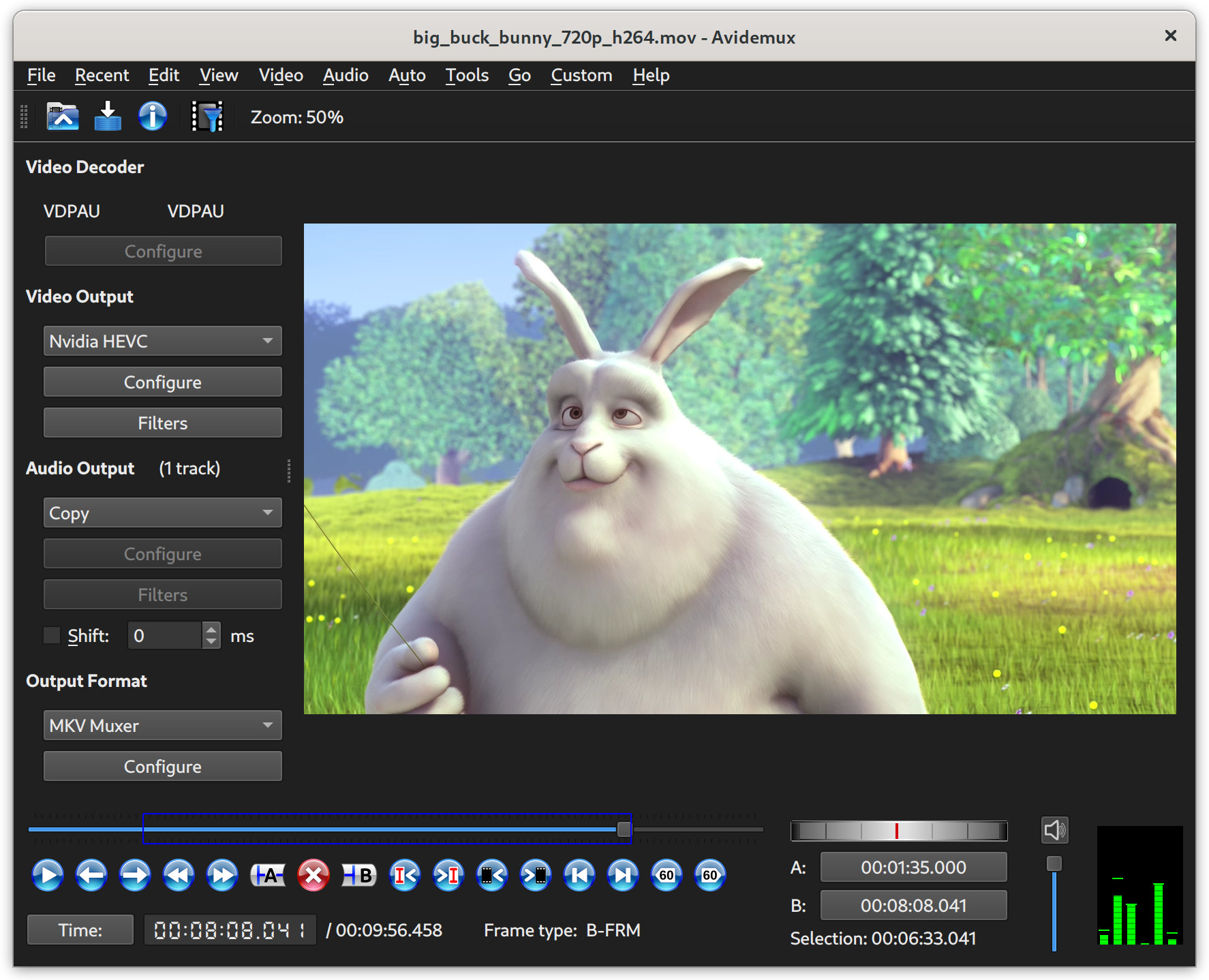
Avidemux

Avidemux下載網址:http://0rz.tw/EQU7W

教學
http://www.techbang.com/posts/8002-190-cover-part2-easily-cut-editing-high-definition-movie-memories-scenes-jumping-on-january?page=2


-------------------------------------------------------------------------------------


Free Video Dub

Free Video Dub下載網址:http://www.dvdvideosoft.com

教學
http://www.techbang.com/posts/8002-190-cover-part2-easily-cut-editing-high-definition-movie-memories-scenes-jumping-on-january?page=4


-------------------------------------------------------------------------------------

影片剪輯雲端中文版 WeVideo
http://www.bnext.com.tw/ext_rss/view/id/680515


-------------------------------------------------------------------------------------


yutube自己出的剪輯軟體
https://free.com.tw/tubechop/

剪完後 把網址丟到這裡 http://www.clipconverter.cc/ 就可以下載yutube剪完後的影片


flash轉格式在illustrator上開啟


此篇備忘錄 請參考圖片


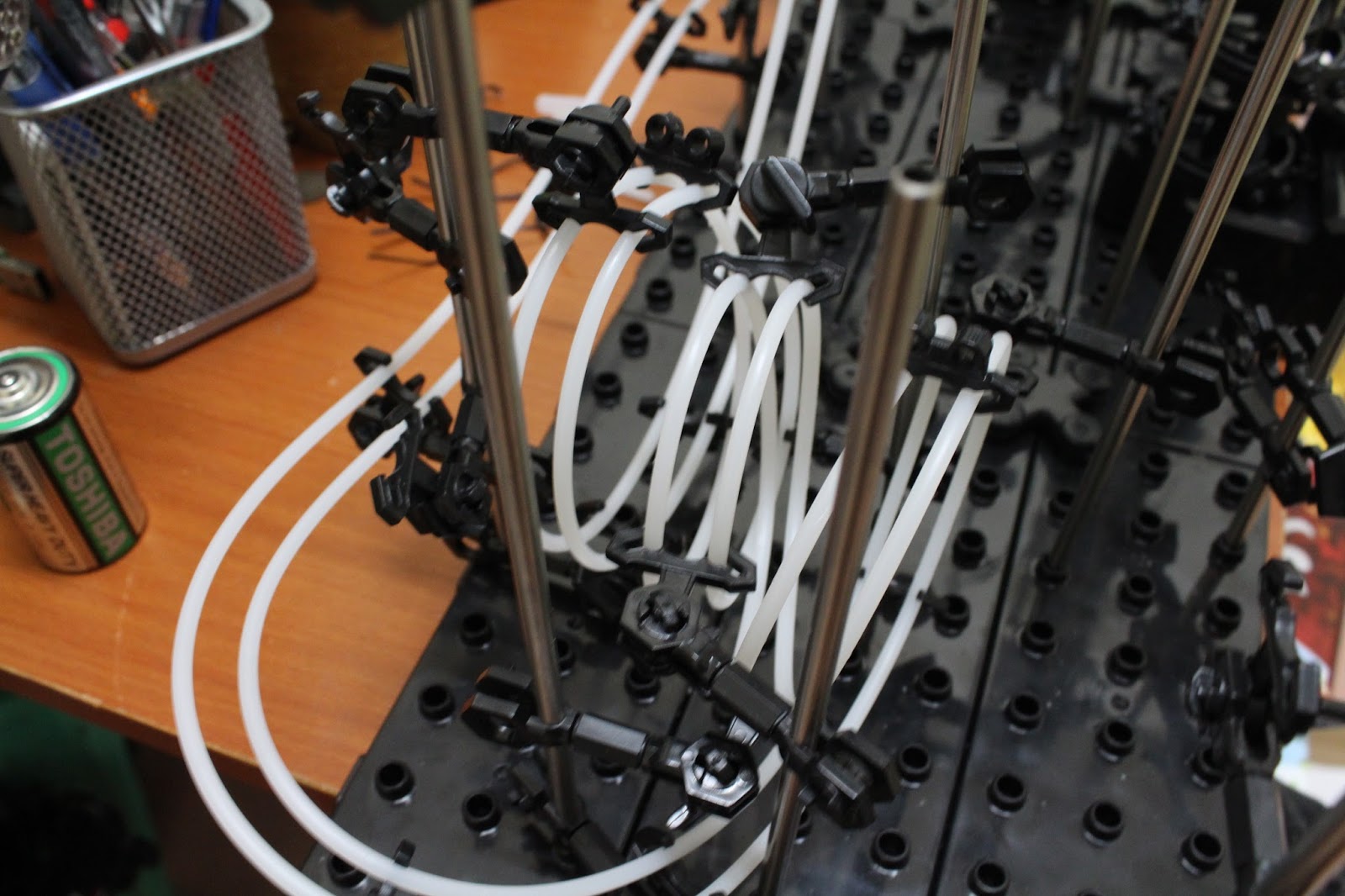
底下這玩具叫太空飛球,小時候只能看別人玩,感覺好像很難的樣子
終於有時間自己買回來動手做做看,蠻有趣的,也真的蠻難的

困難的點主要都是在橋買回來的線要折或彎曲成自己要的路線
鋼珠要不斷的試跑路線看是否順暢,讓它成為一個迴流回到路線上
造成一個迴圈


moto 360 2nd(2代)介紹與實際應用


花了好些時間,透過美國代購 USBuy , 2個星期後入手moto360 2nd
這次選擇46mm 較大的錶框


接著進行初始化工作,電力需保持50%以上,
而且一定要用moto自己的磁力充電,並且連結一隻手機
配對的軟體請指定使用 android wear
一般藍芽配對是無效的喔
(藍芽可以配對,但後續安裝app與一些相對應的功能安裝時會有異常)
如果不小心與藍芽配對造成的異常,可以重新factory reset


接著進入手錶畫面就可以開始在手機上安裝app
安裝後的app會自動同步sync到手錶上

1.首先錶面選擇樣式是一定要的啦
除了原廠附的外,還有其他app可下載其他錶面做選擇
(google play搜尋 wear face)
註:不知是否有注意到,搜尋穿戴裝置時,關鍵字請加 wear


2.客製化錶面
客製化錶面的app也不少,這裡選一個我比較喜歡用的
Custom Photo Watch
在相簿裡選要放的照片.縮放到適合大小做剪裁動作


3.地圖功能
其實我最關心就是地圖功能,希望可以看著手錶地圖在國外到處閒晃
不用拿著手機,目前使用的app可以小小滿足,但還有很多改進空間

底下這張圖是 mini map定位結果,大多路名還是英文


底下這張則是city map定位結果,是目前wear map裡面最快速也是快好的


原生的google就先不用想,非常難用,很多問題未解決


即時透過語音搜尋中文地名,要看細部地圖操作上也是很困難


4.電池的使用量
電池在原本的moto360裡是找不到目前電量資訊
所以特地安裝了一個 Wear Battery Stats


5.google 搜尋
搜尋結果呈現,結果表現是還可以,即使選擇46mm較大的螢幕
看起來還是很吃力,


6.手機上圖片瀏覽
目前其實還沒有一個app真正做的好的,所以筆著先用 MyRoll這套來介紹

MyRoll的確真的可以搜尋手機上所有相簿內容
可惜是解析較高的圖片它無法縮放,導致在手錶上看會很不清楚


一般圖片解析度剛好的,瀏覽起來就還ok


7.moto其實內建很多關於人健康輔助的app
像是心率,每日步數之類


每日步數,目標是10000,他會顯示一週內的狀況,昨天的步數,還差幾步到達目標